
DAKEFPV F722 Flight Controller with 3-6S 60A 4in1 ESC STACK for FPV Racing Drone
Original price was: 9,000৳ .7,999৳ Current price is: 7,999৳ .
Only 2 left in stock
Description
DAKEFPV F722 Flight Controller with 3-6S 60A 4in1 ESC STACK for FPV Racing Drone
1. Product Overview
The DAKEFPC F722 3-6S 60A Stack is a high-performance flight control system designed for FPV (First Person View) drones. This integrated unit combines an F722 Flight Controller (FC) with a BLHELI_S 60A 4in1 Electronic Speed Controller (ESC), offering a compact and robust solution for demanding FPV applications.
It features an F722 processor and ICM42688P gyro for precise and stable flight control, ensuring responsive performance for freestyle maneuvers and racing. The BLHELI_S 60A 4in1 ESC efficiently manages motor power, contributing to enhanced flight time and reliability. Built with durable metal materials and a standard 30.5×30.5mm mounting pattern, this stack is suitable for DIY drone enthusiasts and FPV pilots seeking to upgrade their setups for improved control and efficiency.
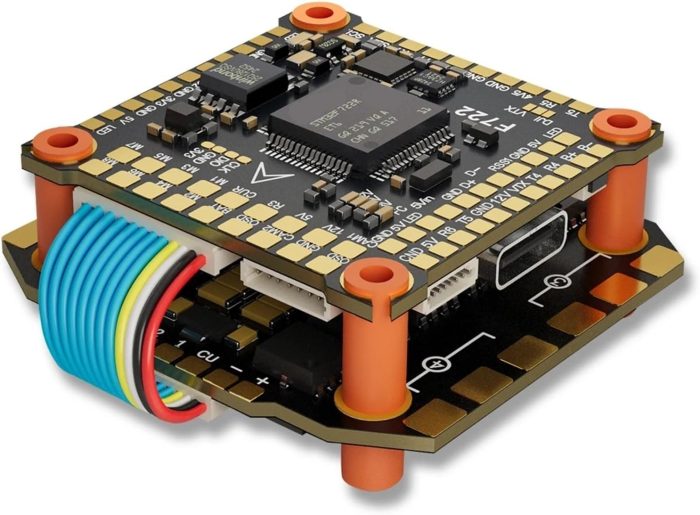
 Image 1.1: Angled view of the DAKEFPC F722 Flight Controller and 4in1 ESC stack, showcasing its compact design and integrated components.
2. Safety Information
Please read and understand all instructions before operating this product. Improper use can lead to damage, injury, or property loss. Always observe the following safety precautions:
- Power Source: Ensure the power source (battery) is correctly connected and within the specified voltage range (3-8S LiPo). Incorrect voltage can cause permanent damage.
- Polarity: Always double-check power polarity before connecting the battery. Reverse polarity will damage the unit.
- Soldering: Use appropriate soldering techniques and equipment. Poor soldering can lead to intermittent connections or short circuits.
- Motor Rotation: Verify motor rotation direction in software before propeller installation. Incorrect rotation can cause loss of control.
- Propellers: Never install propellers when configuring or testing the flight controller. Motors can spin unexpectedly.
- Heat: ESCs can generate significant heat during operation. Ensure adequate airflow and avoid touching components immediately after use.
- Environment: Operate FPV drones in safe, open areas, away from people, animals, and property.
- Age Restriction: This product is recommended for users aged 14 and above.
3. Package Contents
Verify that all components are present in your package:
- F722 Flight Controller
- BLHELI_S 60A 4in1 ESC
- Connection Cables (various types for FC to ESC, receiver, etc.)
- Mounting Hardware (screws, nuts, standoffs)
- Capacitor
- Battery Pigtail (XT60 or similar)
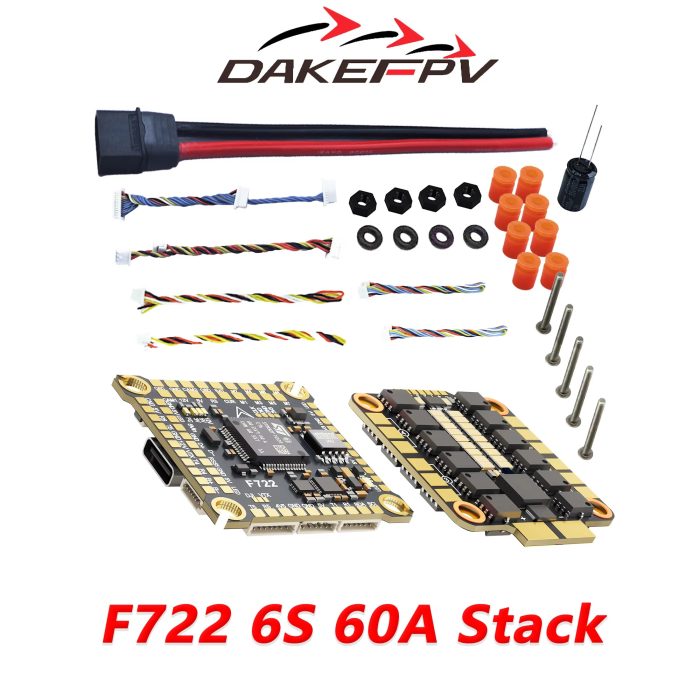
 Image 3.1: Contents of the DAKEFPC F722 8S 60A Stack package, including the flight controller, ESC, cables, and mounting hardware.
4. Setup
4.1 Physical Installation
- Mounting: The F722 8S 60A Stack uses a standard 30.5×30.5mm mounting pattern. Secure the ESC to your drone frame using the provided standoffs and screws. Ensure proper insulation to prevent short circuits.
- Stack Assembly: Connect the flight controller to the ESC using the ribbon cable. Carefully align the pins and press firmly. Mount the FC on top of the ESC using the remaining standoffs.
 Image 4.1: Exploded view of the DAKEFPC F722 Flight Controller and 4in1 ESC, illustrating how the two main boards connect to form the stack.
4.2 Wiring Diagram
Refer to the specific wiring diagram for your F722 Flight Controller model. General connections include:
- Battery Input: Solder the battery pigtail (XT60) to the large BAT+/GND pads on the ESC. Ensure correct polarity.
- Motors: Solder motor wires to the corresponding motor pads (M1-M4) on the ESC.
- Receiver (RX): Connect your receiver to the appropriate UART pads on the FC (e.g., SBUS, PPM, CRSF).
- Video Transmitter (VTX): Connect VTX power (typically 9V or 5V) and video signal to the designated pads on the FC.
- Camera: Connect FPV camera power (typically 5V) and video signal to the designated pads on the FC.
- GPS/Other Peripherals: Connect any additional peripherals (e.g., GPS, LED, Buzzer) to available UARTs or dedicated pads.
 Image 4.2: Top-down view of the DAKEFPC F722 Flight Controller and 4in1 ESC stack, highlighting the various connection pads for peripherals and power.
4.3 Software Configuration
The F722 Flight Controller typically runs Betaflight or INAV firmware. The BLHELI_S ESC requires configuration via BLHeliSuite32 or Passthrough from Betaflight.
- Install Drivers: Connect the FC to your computer via USB. Install necessary DFU drivers if prompted.
- Flash Firmware: Use the Betaflight Configurator (or INAV Configurator) to flash the latest stable firmware for your F722 board.
- Initial Setup: Follow the Betaflight/INAV setup wizard to configure basic settings, including accelerometer calibration, port configuration, receiver setup, and flight modes.
- ESC Configuration: Use the ESC configurator (e.g., BLHeliSuite32 via Betaflight Passthrough) to update ESC firmware, set motor direction, and configure DShot protocol.
- Motor Test: With propellers removed, test motor functionality in the Betaflight Motors tab. Ensure all motors spin correctly and in the desired direction.
5. Operating Instructions
Once the flight controller and ESC are properly installed and configured, you can proceed with operation:
- Pre-Flight Check: Before each flight, visually inspect the drone for any loose connections, damaged wires, or structural issues. Ensure propellers are securely attached and undamaged.
- Power On: Connect the LiPo battery to the drone. The flight controller will power up, indicated by LED lights.
- Arming: Arm the drone using the designated switch on your radio transmitter. Ensure you are in a safe, open area before arming. Motors will typically spin slowly upon arming.
- Flight: Control the drone using your radio transmitter. Start with gentle movements to familiarize yourself with its response.
- Disarming: Disarm the drone using the designated switch on your radio transmitter after landing. This will stop the motors.
- Power Off: Disconnect the LiPo battery from the drone after disarming.
6. Maintenance
Regular maintenance helps ensure the longevity and reliable performance of your F722 3-6S 60A Stack:
- Visual Inspection: Periodically inspect the flight controller and ESC for any signs of physical damage, burnt components, or loose solder joints.
- Cleaning: Gently clean any dust, dirt, or debris from the boards using a soft brush or compressed air. Avoid using liquids.
- Firmware Updates: Keep the flight controller and ESC firmware updated to the latest stable versions to benefit from bug fixes and performance improvements.
- Cable Management: Ensure all cables are neatly routed and secured to prevent them from interfering with propellers or other moving parts.
7. Specifications
Key technical specifications for the DAKEFPC F722 8S 60A Stack:
- Flight Controller (FC) Processor: F722
- Gyro: ICM42688P
- Input Voltage: 3-6S LiPo
- ESC Continuous Current: 60A (per channel)
- ESC Firmware: BLHELI_S
- Mounting Pattern: 30.5×30.5mm
- Dimensions: Approximately 1 x 1 x 1 cm (assembled stack)
- Weight: Approximately 50 g
- Manufacturer Reference: NNVCPUAPY-F7228S60ASTACK

Related products
-
HC-06 bluetooth module
Original price was: 350৳ .330৳ Current price is: 330৳ . -
Ublox NEO-M8N GPS Module
Original price was: 2,500৳ .2,400৳ Current price is: 2,400৳ . -
2.4GHz Wireless Module NRF24L01
Price range: 230৳ through 330৳Select options This product has multiple variants. The options may be chosen on the product page -
3DR 915Mhz Radio Telemetry 500MW
Original price was: 8,000৳ .6,500৳ Current price is: 6,500৳ .


